

For many Tanzanian students, understanding how to sign HESLB Boom correctly is one of the most important steps in accessing their Higher Education Students’ Loans Board (HESLB) funds. Every year, thousands of students face delays or confusion simply because they do not know the correct process to sign HESLB Boom using the official HESLB App.
Fortunately, the process to sign HESLB Boom has become easier, faster, and more reliable thanks to the HESLB mobile application available on both Android and iOS devices. If you are a new student or a continuing beneficiary, learning how to sign HESLB Boom step by step will save you time, reduce stress, and help you access your disbursement smoothly.
In this guide, you will learn simple and proven steps every student must know to sign HESLB Boom using the HESLB App. The instructions are easy to follow, beginner-friendly, and based entirely on the official system flow. If you want to avoid common mistakes and successfully sign Boom, read this guide carefully until the end.
Step-by-Step Guide on How to Sign HESLB Boom Using the App
Before starting the main steps, ensure you have a smartphone, stable internet connection, and your correct login details from OLAMS. The following steps explain clearly how to sign Boom without confusion.
Step 1: Download the Official HESLB App
The first and most important step to sign HESLB Boom is installing the official HESLB application.
-
Open Google Play Store if you are using an Android phone
-
Or open Apple App Store if you are using an iPhone
-
Search for “HESLB App”
-
Download and install the application on your phone
This app is the official platform used to sign Boom, check disbursement status, and manage your loan information.
Step 2: Open the App and Enter Your Login Information
After installation, open the app to begin the process to sign HESLB Boom.
You will be required to fill in the following information:
-
Username: Your Form Four Index Number
-
Password: The same password you used in OLAMS
Make sure your information is correct. Incorrect details may prevent you from completing the process to sign HESLB Boom successfully.
Once the details are entered correctly, click Sign Up.
Step 3: Sign Up and Activate Your Account
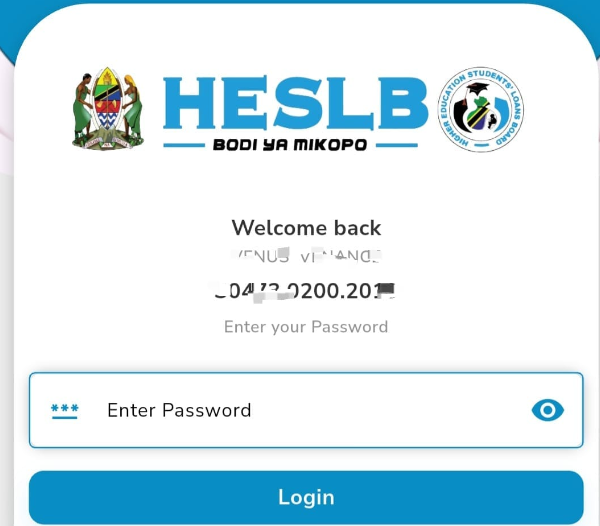
After clicking Sign Up, your account will be created in the HESLB system. This step officially links your details to the platform, allowing you to sign HESLB Boom whenever required.
After successful signup:
-
You can log in at any time
-
You will use your Index Number and Password to access the app
-
Your loan details will now be visible in the system
This step is essential because without it, you cannot continue with the process to sign HESLB Boom.
Once logged in, follow these exact steps to continue the process to sign Boom:
-
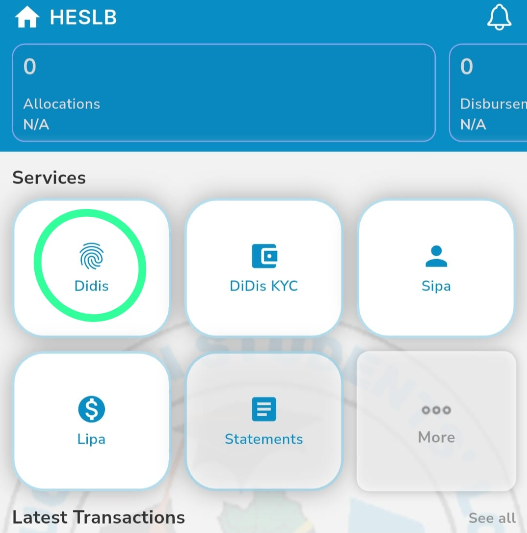
Go to DIDIS
-
Click on Pending
-
Search for HESLB Login
-
Log in again if prompted
-
Select Registered User
-
Go back to DIDIS
-
Click on Disbursement
These steps connect you to the section where you finalize the process to sign HESLB Boom.
Step 5: OTP Verification Process
At this stage, an OTP (One-Time Password) is required to complete the process to sign HESLB Boom.
-
Go to the OTP section
-
Wait for the OTP message sent to your phone
-
Copy the OTP
-
Return to the HESLB App
-
Paste the OTP as instructed
Important Note:
This process works most effectively when you are within less than 10 meters of the specified area, usually near your bank or designated location. Be patient and wait for the SMS from your bank.
OTP verification is a crucial security step when you sign HESLB Boom, so do not skip or rush it.
Step 6: Confirmation of Funds and Withdrawal
After successful OTP verification, your loan funds will be processed. Once the money enters your bank account:
-
You will receive a confirmation message
-
You can withdraw the money through:
-
Your bank branch
-
Or any ATM linked to your bank
-
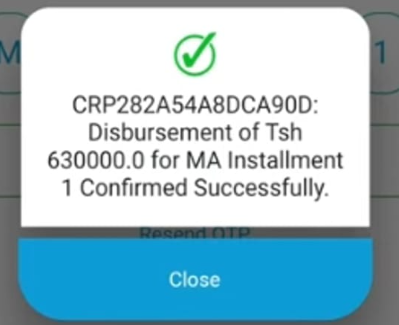
At this point, the process to sign Boom is fully completed, and your disbursement is successful.
Common Tips to Successfully Sign HESLB Boom
-
Always use the correct Index Number
-
Ensure your OLAMS password is correct
-
Keep your phone nearby when waiting for OTP
-
Avoid sharing your login details
-
Ensure strong internet connection
Following these tips will make it easier and faster to sign Boom without errors.
Learning how to sign HESLB Boom through the app is a vital skill every student must have. With the HESLB App, the entire process has become more transparent, secure, and convenient. By following the steps outlined in this guide—from downloading the app, signing up, navigating DIDIS, verifying OTP, and confirming disbursement—you can sign Boom confidently and without unnecessary stress.
If you carefully follow each step and remain patient during OTP verification, you will successfully sign HESLB Boom and access your funds on time. Make sure to bookmark this guide, share it with fellow students, and refer back whenever you need help to sign Boom again.
Remember, understanding how to sign HESLB Boom correctly today saves you from delays tomorrow.
READ ALSO: HESLB Account: Everything You Must Know to Successfully Secure Your Loan